
Best animation apps – level up your storytelling
The best animation apps, the right animation software and trusted agencies when DIY isn’t the answer. Everything you need to choose, in one place.
Animation is everywhere today, in apps, presentations, marketing materials, and product communication. What’s interesting is how accessible animation tools have become: beginners and experienced creators often work with the same software, with the real difference being how they use it.
In this article, we take a closer look at 10 of the most popular animation apps in 2026, ranging from simple 2D tools to more advanced software used in commercial work. And if creating animations on your own isn’t the right option, we’ve also included a curated list of trusted animation studios recommended by Clutch.
Expert partner in animation and visual storytelling
At Explain Visually, we are industry leaders in creating compelling animated content for businesses and organizations. As the authors of this comprehensive guide, we bring our extensive expertise in animation and visual storytelling to help you navigate the world of animation apps and software. With years of experience in crafting engaging visual narratives, we understand the power of animation in conveying complex ideas and captivating audiences.
ExplainVisually showreel
Our team of expert animators and storytellers specializes in transforming your ideas into stunning, professional-quality animations. We offer a wide range of services tailored to meet your specific needs:
- Marketing and sales materials that intrigue customers and boost conversions.
- Strategic internal communications to engage employees and clarify company initiatives.
- Procedure implementations that simplify complex processes for your team.
- Custom animations for product demonstrations, explainer videos, and brand storytelling.
- OnePagers and sales presentations that effectively communicate your value proposition.
Our proven approach ensures your message is delivered with maximum impact. By partnering with us, you gain access to cutting-edge animation techniques and a team dedicated to bringing your vision to life.
Introduction to animation videos
Let’s start with a basic introduction to animated videos. Animation apps have transformed the way we create and consume visual content. These tools help artists and marketers animate their ideas with moving images and characters. With the rapid advancement of technology, animation apps have become more accessible and feature-rich, allowing users to create professional-quality animations with ease.
The animation industry has seen tremendous growth in recent years, driven by the increasing demand for animated content across various sectors. From entertainment and education to marketing and social media, animated videos have become a preferred medium for engaging audiences and conveying complex ideas. Music animated videos, in particular, have gained popularity across various platforms.
At Explain Visually, we’ve witnessed firsthand the impact of animated storytelling on audience engagement and information retention. Our team of expert animators leverages cutting-edge animation tools to create compelling visual narratives that simplify complex concepts and captivate viewers across industries. By harnessing the power of animation, we’ve helped countless clients transform their ideas into memorable, shareable content that resonates with their target audience.
As a result, animation apps also have evolved to cater to a wide range of users, from hobbyists to professional animators working in studios.
You can read more about creating 2D animations in one of our guides: What is 2D animation? A beginner’s guide to getting started.
What are animation apps?
Animation apps are software applications designed to create animated content, ranging from simple 2D animations to complex 3D visual effects. These tools provide users with a digital canvas and a set of features to draw, animate, and edit characters, objects, and scenes. Animation apps typically offer a combination of drawing tools, timeline editors, and rendering capabilities to produce smooth and visually appealing animations. Many also allow users to edit audio clips, enhancing the overall audiovisual experience.
The versatility of modern animation apps extends beyond traditional cartoon-style animations. Today’s software lets users create diverse animated content, including motion graphics, film and TV effects, web animations, and AR experiences. This growth in capabilities has made animation essential in many industries, including advertising, education, gaming, and science.
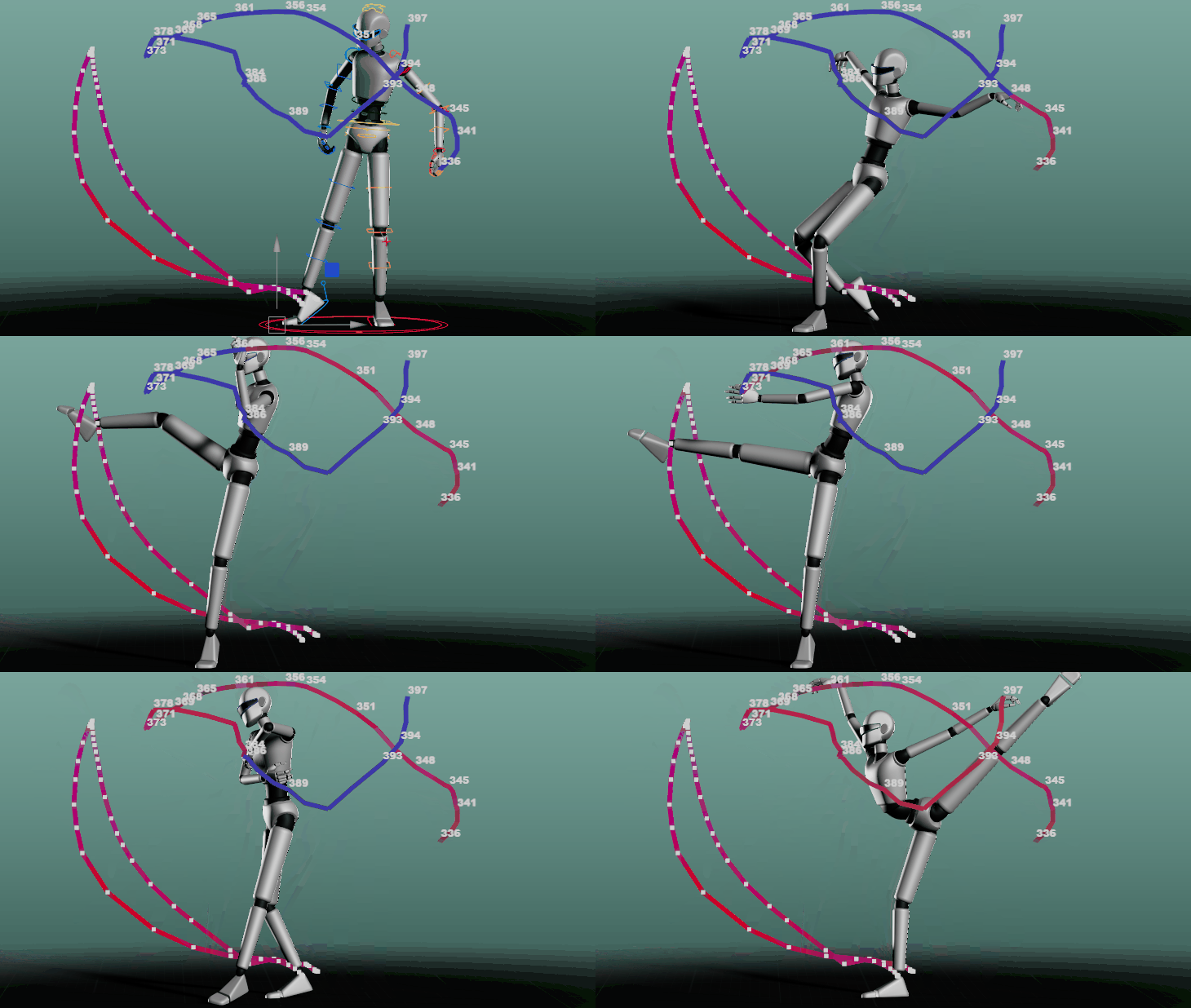
Animation apps are characterized by:
- Intuitive interfaces that simplify the animation process, often featuring drag-and-drop functionality and customizable workspaces to accommodate different workflow preferences.
- A variety of drawing and painting tools for creating assets, including pressure-sensitive brushes, vector tools, and texture mapping capabilities to achieve diverse artistic styles.
- Timeline-based editing for precise control over animation sequences, allowing animators to fine-tune timing, pacing, and movement with frame-by-frame accuracy.
- Support for different animation techniques, such as frame-by-frame animation for traditional hand-drawn styles, keyframe animation for smoother transitions, and procedural animation for generating complex movements automatically.
- Advanced rigging and skeletal systems that enable realistic character animations, allowing for nuanced expressions and fluid movements in both 2D and 3D environments.
- Powerful rendering engines that can produce high-quality output, often with options for real-time previews to streamline the creative process.
- Export options for various file formats and platforms, ensuring compatibility with different distribution channels and devices, from social media to cinematic productions.
Best animation software for beginners
For those new to animation, choosing the right software can be overwhelming. Fortunately, there are several user-friendly options that cater specifically to beginners. These apps offer intuitive interfaces, basic animation tools, and helpful tutorials to guide users through the animation process. By starting with beginner-friendly software, aspiring animators can learn the fundamentals of animation without feeling overwhelmed by complex features.
FlipaClip
FlipaClip is a popular animation app that has gained a significant following among beginners and hobbyists. This user-friendly app allows users to create 2D animations directly on their mobile devices, making it accessible for those who want to start animating without investing in expensive hardware or software.
FlipaClip offers a range of essential tools for creating frame-by-frame animations, including various brush types, layers, and onion skinning. The app’s intuitive interface makes it easy for beginners to understand the basics of animation while providing enough features for more advanced users to create complex animations.

FlipaClip offers a range of tools for creating frame-by-frame animations
- Various brushes, lasso, fill, eraser, ruler shapes, and mirror tool.
- Up to 10 animation layers with effects like Glow and Pixel.
- Add sound effects, voiceovers, and music tracks.
- Simplifies the animation process.
- Ensures seamless workflow.
- Save animations as MP4, GIF, or PNG sequences.
FlipaClip offers both free and paid versions. The free version provides basic features, while the premium subscription (FlipaClip Plus) unlocks additional tools and removes ads. As of 2025, the app has moved to a subscription model, which has received mixed reactions from users.
Pencil2D
Pencil2D is an open-source animation software that focuses on simplicity and ease of use. This best free animation software is perfect for beginners who want to explore traditional hand-drawn animation techniques without a steep learning curve.
The software offers both bitmap and vector drawing capabilities, allowing users to switch between raster and vector workflows seamlessly. Pencil2D’s straightforward interface and basic toolset make it an excellent choice for those just starting their animation journey, while its cross-platform compatibility ensures accessibility for users on different operating systems.
Pencil2D offers a range of tools for creating frame-by-frame animations:
- Bitmap and vector drawing capabilities.
- Onion skinning for easier frame transitions.
- Layer-based editing.
- Timeline and keyframe management.
- Export options including image sequences and video formats.
The software supports both raster and vector workflows, allowing users to switch between them seamlessly. One of the most attractive features of Pencil2D is its pricing – it is completely free to use, even for commercial purposes. This makes it an excellent option for students, hobbyists, and small businesses looking to create animations without investing in expensive software. The open-source nature of Pencil2D also means that it is continually being improved and updated by a community of developers.
Krita
Krita is open-source digital painting and animation software that has gained popularity among beginners and professionals alike. Its user-friendly interface and comprehensive set of tools make it an excellent choice for those starting their animation journey.
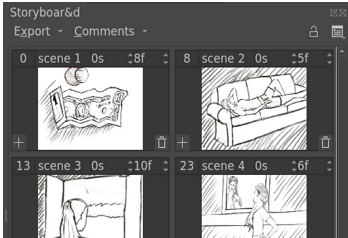
Krita offers a range of features for creating 2D animations:
- Frame-by-frame animation with support for thousands of frames on the timeline.
- Onion skinning to help with creating smooth transitions between frames.
- Multiple layers and audio support for complex animations.
- Playback controls with pausing, playing, and timeline scrubbing.
- Tweening capabilities for opacity and position changes.
- Export options to video or still images.
Perhaps the most attractive aspect of Krita for beginners is its pricing – it’s completely free and open-source. This means aspiring animators can access professional-grade tools without any financial investment. The active community behind Krita also ensures regular updates and improvements to the software.
We also encourage you to read our other article: Animated ads – types, examples, prices.
Top animation tools for creative storytelling
For those looking to take their animation skills to the next level, there are several powerful tools designed for creative storytelling. These animation apps offer advanced features, professional-grade tools, and extensive libraries of assets to help bring your stories to life. Whether you’re creating animated shorts, explainer videos, or feature-length films, these tools provide the capabilities needed to produce high-quality animations.
Adobe Animate CC
Adobe Animate CC is a versatile animation software that has long been a favorite among professional animators and graphic designers. As part of the Adobe Creative Cloud suite, it integrates seamlessly with other Adobe applications, providing a comprehensive workflow for creating animated content.
Adobe Animate CC offers a wide range of tools for creating both 2D and interactive animations. With its comprehensive set of editing tools, animators can fine-tune every aspect of their creations. Its powerful vector drawing tools, combined with advanced rigging and inverse kinematics capabilities, allow animators to create complex character animations with ease. The software also supports HTML5 Canvas, WebGL, and SVG output, making it ideal for creating animations for web and mobile platforms.

Adobe Animate CC offers a range of tools for creating frame-by-frame animations:
- Vector and bitmap drawing tools.
- Timeline-based animation.
- Puppet tools for character animation.
- Audio integration.
- Publishing options for multiple platforms (HTML5 Canvas, WebGL, SVG, and more).
- Integration with other Adobe Creative Cloud apps.
As of January 2025, Adobe Animate CC is available through Adobe’s Creative Cloud subscription.
OpenToonz
OpenToonz is a powerful open-source animation software that has gained popularity among independent animators and small studios. Originally developed by Studio Ghibli, this software offers professional-grade tools for creating 2D animations.
OpenToonz provides a comprehensive set of features for traditional animation, including advanced drawing tools, a sophisticated color palette system, and powerful compositing capabilities. Its node-based effects system allows for complex visual effects, while the Plastic tool offers advanced deformation and rigging options for character animation.
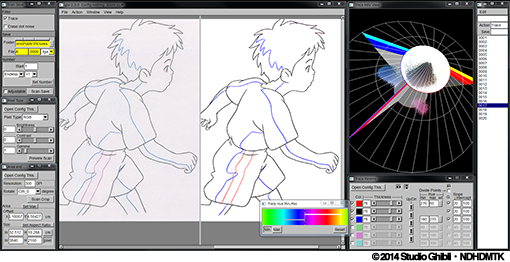
OpenToonz offers a wide range of tools for creating 2D animations:
- Vector and raster drawing capabilities.
- Frame-by-frame and keyframe animation.
- Onion skinning for easier frame transitions.
- Layer-based editing with up to 10 layers.
- Timeline and Xsheet management.
- Various effects and compositing options.
- Audio integration and synchronization, including the ability to import personal audio files.
- Export options for multiple formats including MP4, GIF, and PNG sequences.
One of the most attractive features of OpenToonz is that it is completely free and open-source. This makes it an excellent option for independent animators, small studios, and those on a tight budget.
Toon Boom Harmony
Toon Boom Harmony is a professional-grade animation software widely used in the animation industry. It offers a comprehensive set of tools for creating high-quality 2D animations, from concept to final production.
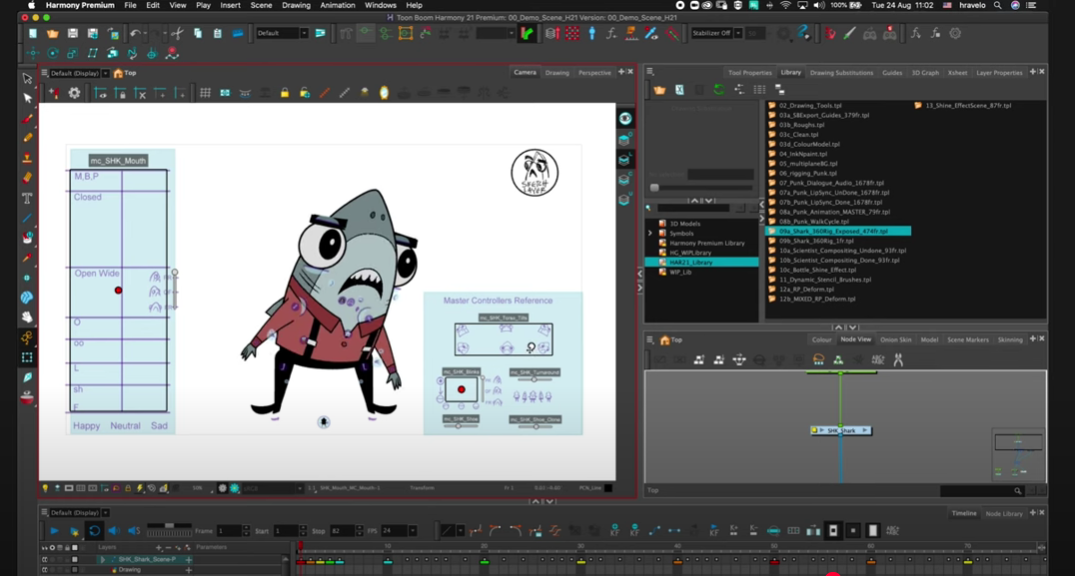
Toon Boom Harmony provides advanced features such as:
- Powerful rigging tools for complex character animations.
- Node-based compositing for sophisticated visual effects.
- Bitmap and vector drawing capabilities.
- Advanced color palette management.
- 3D integration for creating 2D/3D hybrid animations.
- Camera and multi-plane features for depth and perspective.
Pricing for Toon Boom Harmony varies depending on the version and licensing options. As of 2025, they offer subscription-based models for individuals and teams, with prices starting from around $25 per month for the Essentials version.
Moho (Anime Studio)
Moho, formerly known as Anime Studio, is a versatile 2D animation software that caters to both beginners and professionals. It’s particularly popular for its intuitive interface and powerful character animation tools.
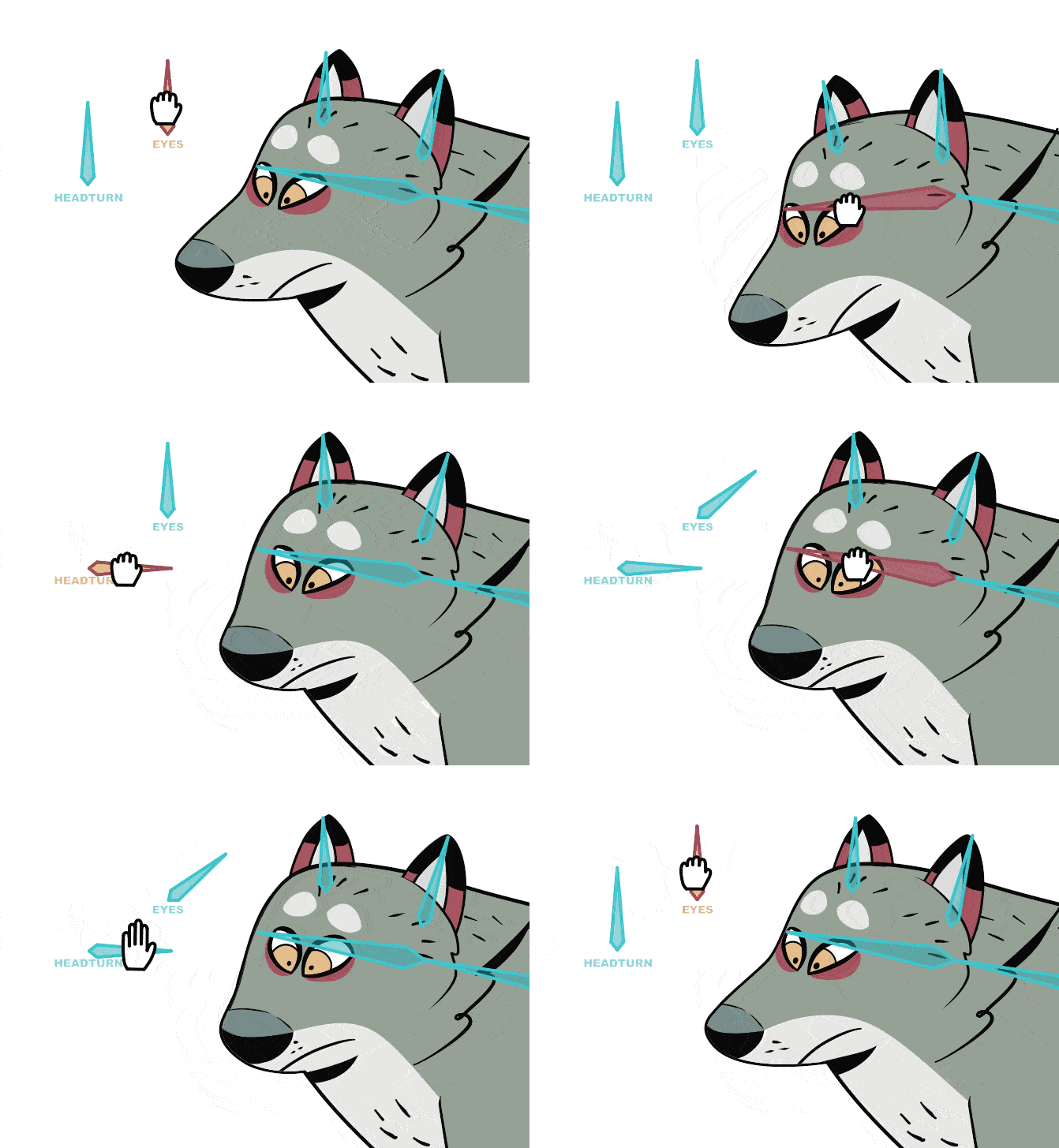
Key features of Moho include:
- Smart Bones system for easy and flexible character rigging.
- Freehand drawing tools with pressure sensitivity support.
- Physics engine for realistic motion and interactions.
- Audio synchronization for lip-syncing and timing.
- Built-in character templates and assets.
- Support for both frame-by-frame and cut-out animation techniques.
Moho offers two versions: Moho Debut for beginners and Moho Pro for professionals. They also offer subscription-based options for more flexibility.
3D animation apps
As 3D animation continues to dominate the entertainment and visualization industries, several powerful 3D animation apps have emerged to meet the growing demand. These tools offer advanced modeling, rigging, and animation capabilities, allowing artists to create stunning 3D animations for films, games, and virtual reality experiences.
See an example of our animation showing 3D models of products made for customers.
Autodesk Maya
Autodesk Maya is widely regarded as the industry standard for 3D animation and visual effects. Used by major studios and independent artists alike, Maya offers a comprehensive suite of tools for modeling, rigging, animation, and rendering.
Maya’s powerful animation tools include advanced character rigging systems, motion capture integration, and sophisticated dynamics simulations. The software’s extensibility through scripting and plugins makes it highly customizable, allowing studios to tailor it to their specific production needs. While Maya has a steep learning curve, its unparalleled capabilities make it the go-to choice for professional 3D animators.
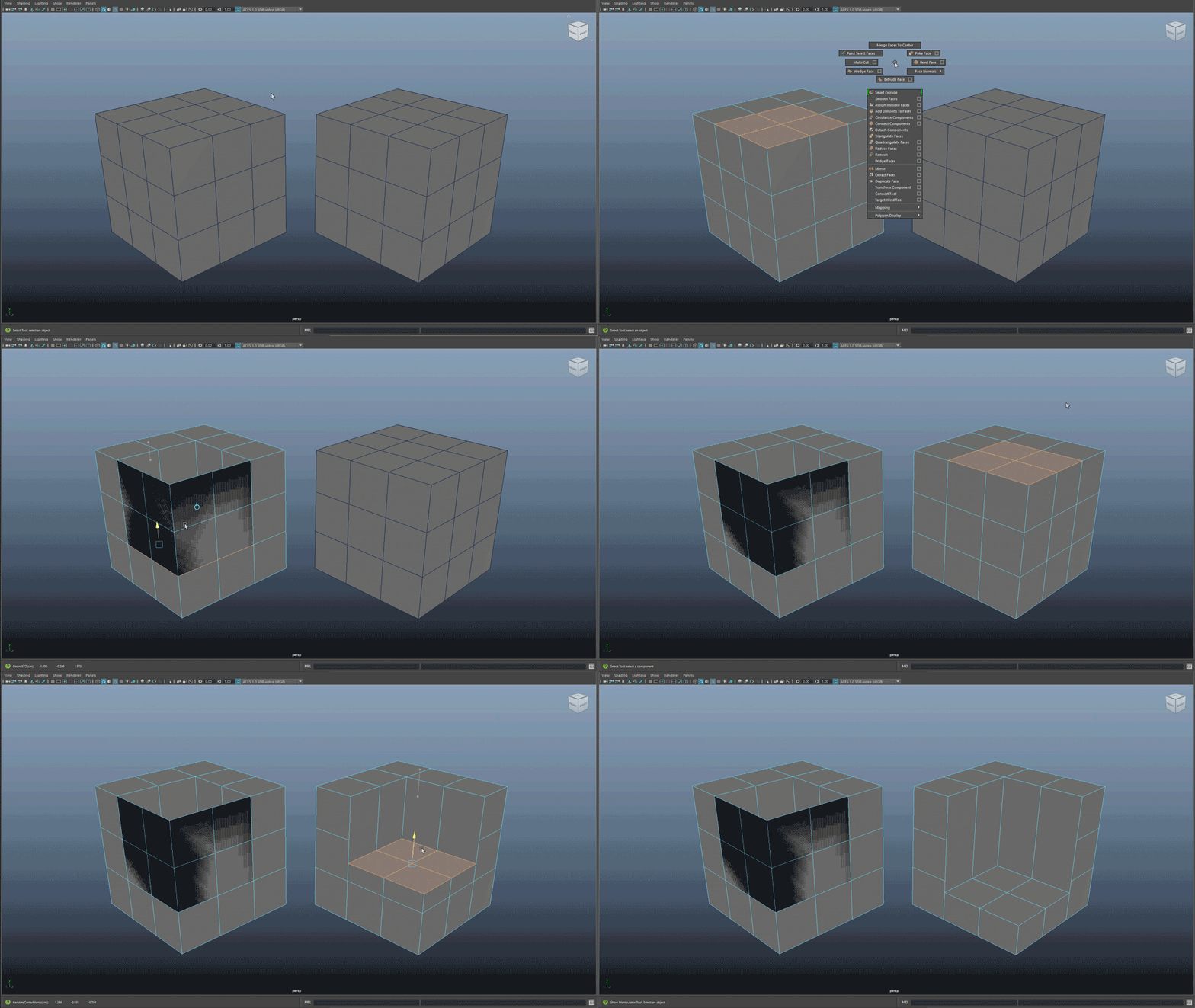
The latest version, Maya 2025, introduces several new features and improvements:
- Smart Extrude feature for more efficient face extrusion in 3D modeling
- Redesigned Dope Sheet editor and Motion Trail Editor for enhanced animation workflows
- Integration with Arnold renderer for high-quality, photorealistic renders
- Powerful dynamics and effects tools for simulating phenomena like cloth, hair, fluids, and particles
- Comprehensive features for character rigging and skinning
Regarding pricing, as of January 2025, Autodesk Maya is available through subscription.
Blender
Blender is a free, open-source 3D creation suite that has gained significant popularity in recent years. This versatile software offers a complete set of tools for 3D modeling, animation, rendering, and even video editing.
Blender’s animation toolset includes a powerful rigging system, non-linear animation editor, and support for motion capture data. The software’s Grease Pencil feature also allows for 2D animation within a 3D environment, offering unique creative possibilities. With its active community and continuous development, Blender has become a viable alternative to commercial 3D animation software.

Key improvements include:
- New animation layer system.
- 3D onion skinning.
- Node-based rigging components.
- Improved workflow and usability.
- Focus on direct manipulation in the 3D viewport.
Regarding pricing, Blender is completely free and open-source software. It is licensed under the GNU General Public License, which means users can freely use, modify, and distribute the software without any cost. This pricing model makes Blender attractive for anyone seeking a powerful 3D tool without costly licenses.
Cinema 4D
Cinema 4D, developed by Maxon, is a professional 3D modeling, animation, and rendering application known for its user-friendly interface and powerful features. It has become a popular choice among animators, particularly in the fields of motion graphics, visual effects, and architectural visualization.
Cinema 4D offers a comprehensive set of tools for 3D animation, including:
- Intuitive interface suitable for beginners and professionals.
- Advanced character animation tools with a powerful rigging system.
- MoGraph module for creating complex motion graphics.
- Integration with popular compositing software like Adobe After Effects.
- Physical and GPU rendering options for high-quality output.
The software is praised for its stability and relatively gentle learning curve compared to other professional 3D animation tools. Cinema 4D’s integration with standard software makes it versatile for many production pipelines. As of January 2025, Cinema 4D is available through subscription plans.
Choosing the right animation app
Selecting the appropriate animation app is crucial for achieving your creative goals efficiently. Consider your skill level, project requirements, and budget when making your decision. For beginners, apps like FlipaClip or Pencil2D offer a gentle learning curve and basic features to get started. More advanced users might prefer the comprehensive toolsets of Adobe Animate CC or Autodesk Maya.
Example of an animation about the European Rover Challenge prepared by the experts from Explain Visually.
Another option to consider is partnering with professional animation services. At Explain Visually, we specialize in creating high-quality animated content for businesses and organizations. Our team of expert animators utilizes cutting-edge tools and techniques to bring your stories to life, ensuring a polished and professional result. Be sure to check out our projects on YouTube.
Consider Your skill level
When choosing an animation app, it’s essential to assess your current skill level honestly. Beginners may find complex software overwhelming, which can hinder their progress and enthusiasm for animation. Starting with user-friendly apps helps novices learn basics without the clutter of advanced features.
Conversely, experienced animators may find basic apps limiting and may require more sophisticated tools to achieve their desired results. As you advance, you can transition to more sophisticated software for greater control. Many professional animators use a combination of tools, selecting the best app for each specific task or project requirement.
Consider Your project requirements
When selecting an animation app, it’s crucial to consider the specific needs of your project. Different types of animations require different tools and features. For example, if you’re creating a 2D cartoon, you might opt for software like Toon Boom Harmony or Adobe Animate CC. However, if you’re working on 3D character animation for a video game, Autodesk Maya or Blender might be more suitable.
Consider the following factors when evaluating your project requirements:
- Animation style (2D, 3D, stop motion, vector animation, etc.).
- Output format (video, GIF, interactive content).
- Required features (rigging, particle effects, motion graphics).
- Collaboration needs (multi-user support, asset sharing).
- Rendering capabilities and output quality.
Top 10 app animation companies in 2026 (according to Clutch)
Tools are only part of the picture. For many teams, the next step is partnering with an experienced animation studio. To make that easier, we’ve also prepared a list of studios for those who prefer to work with professionals.
Note!
We reviewed dozens of animation studios listed on Clutch and shortlisted companies based on verified reviews, portfolio quality, client profiles, and overall market reputation. While Clutch provides company ratings and verification, it does not publish an official Top 10 ranking for animation studios.
This list reflects our editorial evaluation.
1. Explain Visually
Yes, this is us 🙂 And no, this isn’t us trying to sneak ourselves onto the list.
Even if Explain Visually weren’t involved in this article at all, it would still be hard to leave the studio out, simply because of the kind of projects they consistently deliver.
Explain Visually works primarily with digital products, apps, and complex ideas that need to be communicated clearly. The studio is often chosen by teams who care about structure, logic, and storytelling just as much as visual quality.
Their animations are commonly used in product launches, SaaS platforms, onboarding flows, and internal communication, especially in cases where clarity and understanding matter more than flashy effects or visual noise.
2. ORBIS Production
Based in Milan, ORBIS Production creates animation and video projects for brands that value solid execution and a clean, professional aesthetic. The studio works across a wide range of commercial and branded content, often in collaboration with international clients.
What sets them apart is consistency and a well-run production process. Projects are carefully planned, clearly structured, and delivered without unnecessary surprises. The focus is on dependable execution, delivering exactly what needs to be delivered, without chasing fireworks or unnecessary spectacle. For teams that value reliability as much as visual quality, ORBIS Production is a natural choice.
3. DD.NYC®
DD.NYC® works at the crossroads of animation, video, and brand design. The studio is often brought in when animation needs to support a larger digital product, campaign, or platform. They’re a good fit for teams that treat animation as part of a broader brand system.
4. ANIMWOOD Studio
ANIMWOOD Studio focuses on clear storytelling and clean animation. Their projects often sit somewhere between marketing and education, where the message needs to be easy to follow, not overdesigned. They’re a solid choice for teams looking for a straightforward animation partner with a structured approach.
5. Lemonlight
Lemonlight approaches animation as part of a larger video production ecosystem. The studio works with brands that need content delivered at scale, efficiently and with predictable results.
If animation is one element of an ongoing marketing machine, rather than a one-off creative experiment, Lemonlight tends to fit that setup well.
6. MultiVision Digital Productions
MultiVision Digital Productions is often chosen for corporate and B2B animation projects. Their work typically supports training, internal communication, and product explanations rather than purely promotional content. Clients appreciate their ability to keep complex projects organized and under control from start to finish.
7. Beacons Point
Beacons Point puts a strong emphasis on clarity and collaboration. The studio is frequently praised for communication and for keeping clients closely involved throughout the process.
Their animation work is especially useful when the message needs to be simple, direct, and aligned with specific business goals.
8. Farallon
Farallon blends animation with broader video production services. Their projects often support corporate communication and branded content rather than highly stylized, experimental animation. They’re a good fit for teams that want animation to work quietly in the background as part of a wider content strategy.
9. Casual
Casual is one of those studios with a long track record and a strong creative reputation. They’re often brought in when visual style and confident storytelling really matter.
The studio works well with brands that already know what they want and need an experienced team to execute it properly.
10. Bottle Rocket Media
Bottle Rocket Media offers animation alongside a broader range of video services. Their work is commonly used in marketing and brand communication, where animation needs to fit neatly into existing campaigns. They tend to balance creativity with practicality, which makes them a comfortable choice for teams with clear timelines and business constraints.
Get started with animation apps
Our advise? To begin your animation journey, start by experimenting with free or trial versions of animation apps. Many software packages offer tutorials and forums to help you learn basics and enhance skills. Practice regularly, study the principles of animation, and don’t be afraid to explore different styles and techniques. Be patient, consistent, and humble. Learning is a process that takes time and commitment.
Or maybe you want to gradually master the ability to create simple animations using apps, but also want to take advantage of other solutions?
Check out an example of one of our animations that helped Flobotics encourage potential customers to visit their website.
For those seeking professional-quality animations without the learning curve, consider partnering with animation experts like Explain Visually. Our team of skilled animators and storytellers can bring your ideas to life with stunning visuals and engaging narratives. We offers top-notch animation services tailored to your specific needs. Discover how we can elevate your storytelling through the power of animation. Let’s talk!
𝐄𝐱𝐩𝐥𝐚𝐢𝐧 𝐕𝐢𝐬𝐮𝐚𝐥𝐥𝐲 – 𝐁𝟐𝐁 𝐚𝐧𝐢𝐦𝐚𝐭𝐢𝐨𝐧 𝐬𝐭𝐮𝐝𝐢𝐨:
• We create whiteboard animations for businesses
• We create corporate explainer videos
• We create visual storytelling for companies
Frequently Asked Questions about best animation apps
What are the best animation apps for beginners in 2026?
That said, the easiest animation software isn’t always the most powerful. Once you feel comfortable with basic drawing tools and timelines, you may want to move on to more advanced animation software that gives you greater creative possibilities.
What’s the difference between an animation app and professional animation software?
Animation apps focus on ease of use and quick results.
Animation software offers precise control, advanced features, and professional rendering software.
Professional tools support complex animations, visual effects, and long-form animated videos.
Both have their place, depending on your goals and experience level.
Can I create animated videos using free animation software?
Which animation tools are best for creating smooth and complex animations?
– keyframe animation and motion paths,
– animation layers for better organization,
– motion animation and timing control,
– advanced features for visual effects or motion capture.
Is Adobe Animate still a good choice for 2D animation and interactive animations?
Thanks to its tight integration with Adobe Creative Cloud, Adobe Animate fits well into workflows that involve video editing, exporting animations, and interactive content for the web.
What animation features should I look for when choosing animation software?
At a minimum, most users look for a user friendly interface, reliable drawing tools and onion skinning, flexible exporting animations options and solid video rendering performance. Advanced users may also want precise control over timelines, animation layers, and rendering software.
What’s the difference between keyframe animation and frame-by-frame animation?
Frame-by-frame animation offers unmatched control over animation styles and movement, but it takes more time. Keyframe animation is faster and commonly used in motion studio workflows, especially when working with vector images and motion paths.
Is Autodesk Maya really the industry standard for 3D animation?
Maya’s power comes at a cost, though. Its steep learning curve means it’s usually chosen by professional animators and creative professionals who need advanced tools for motion capture, rendering, and complex 3D animation pipelines.
Can animation apps replace professional animators and studios?
For small projects or quick experiments, an animation app may be enough. For large-scale animated videos, complex animations, or brand-driven storytelling, professional studios bring expertise that goes far beyond software features.
What’s the best animation software for creating animated characters?
More advanced users may prefer 2d animation software or 3d animation tools that allow deeper control over rigs, bitmap graphics, vector images, and motion animation.