
Whiteboard animation remains one of the most commonly chosen formats in B2B. A simple line. Clean frames. Focus on the message. And then the quote arrives, followed by surprise and a series of doubts. One offer comes in at a few thousand, another is several times higher.
Where does that difference come from? Is it about video length, or the prestige of the brand you hire to produce the animation? Often the gap comes from things you will not see in a portfolio preview and that is what this article is about.
Whiteboard animation pricing in 2026 – the ranges you’ll actually see and why
If you are collecting quotes today, you will usually see three clear pricing tiers.
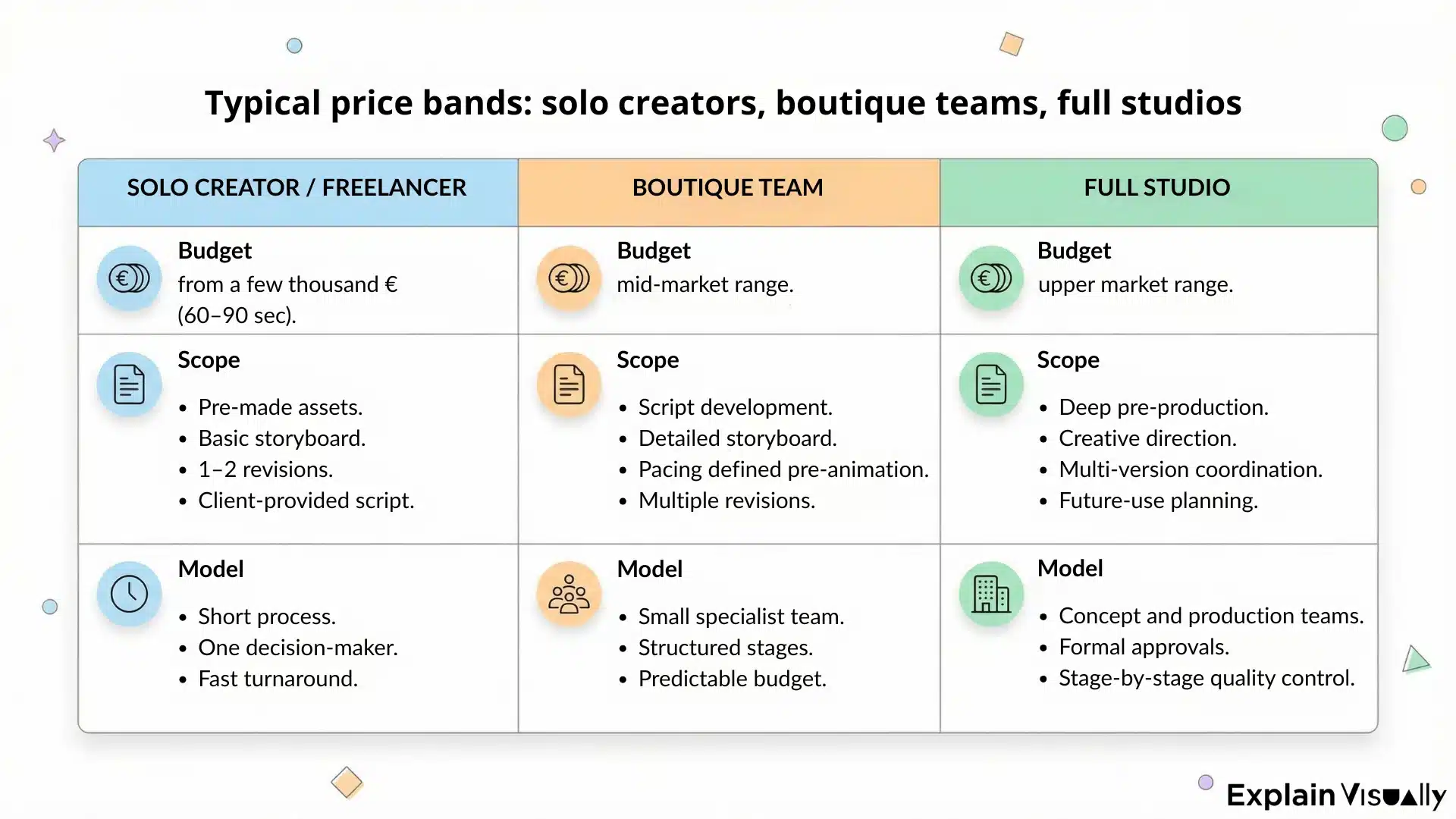
The lowest range belongs to solo creators and freelancers
They often work with pre-made assets, a simplified storyboard, and a limited number of revision rounds. The price can be attractive and, naturally, tempting. A 60-90 second whiteboard animation typically starts at a few thousand euros. Sometimes even less, if the scope is heavily limited.
In this case, caution is necessary. Quick decisions can lead to problems later. This option works well for simple, one-off projects where the risk is low. The process is usually short. Decisions are made quickly and much depends on one person.
The middle tier includes small, boutique teams
Here, a 60-90 second project often falls somewhere between €6,000 and €12,000, depending on scope.
Here, prices move into a range where full script work, a detailed storyboard, and pacing defined before animation become standard. There is usually more time spent refining the concept. More discussions before production starts. More predictability. The budget per minute can be twice as high as with a solo creator, but the scope of responsibility is broader.
The highest tier includes studios with full production capacity
For a comparable 60-90 second whiteboard animation project, pricing often starts around €12,000 to €20,000 and can go higher depending on complexity, licensing, and versioning.
A concept team, director, animators, sound, project coordination. A process with clearly defined stages and quality control at each step. Creative direction, expanded pre-production, and coordination of multiple versions are included. For campaign projects, international rollouts, or content designed to work for several years, this model provides greater control over the entire process.
What changes across tiers (beyond quality)?
The same whiteboard style can cost three different amounts. In one case, you receive an animation based on a ready-made script. In another, the team helps structure the message, shorten it, define the pacing, and build tension. In the third, strategy is added, including how the video will be used in a campaign and how it can be adapted later.
The price reflects the scope of decisions that need to be made on your side. The fewer of those decisions you want to handle yourself, the higher the tier you move into.
2026 pricing signals influencing quotes – rights, versioning, approvals
In 2026, quotes are rarely based on video length alone. A growing part of the budget comes from elements that are not visible in the animation itself. They appear in the proposal as separate line items.
- The first area is usage rights. Distribution scope. License duration. Number of markets. Use in paid campaigns. Full buyout without limitations. Each of these decisions affects the quote.
- The second element is versioning. One language version is one thing. Multiple languages, different aspect ratios, shorter cuts for performance campaigns, adaptations for social media represent a separate scope of work. Each version requires re-editing, subtitle adjustments, export, and quality control.
- The third area is the approval process. The number of people involved on the client side. The number of revision rounds. The moment when the project can move back to the script or storyboard stage. Most studios clearly define the limits of changes and how additional work is billed.
These three factors often explain the differences between proposals that look similar at first glance. If a project includes multiple versions, broad distribution, and long-term use, the budget increases from the start. This should not come as a surprise, since the scope of work and responsibility is greater.
What drives cost – the few inputs that reliably move the number
There are dozens of elements that appear in proposals, but only a few truly move the budget.
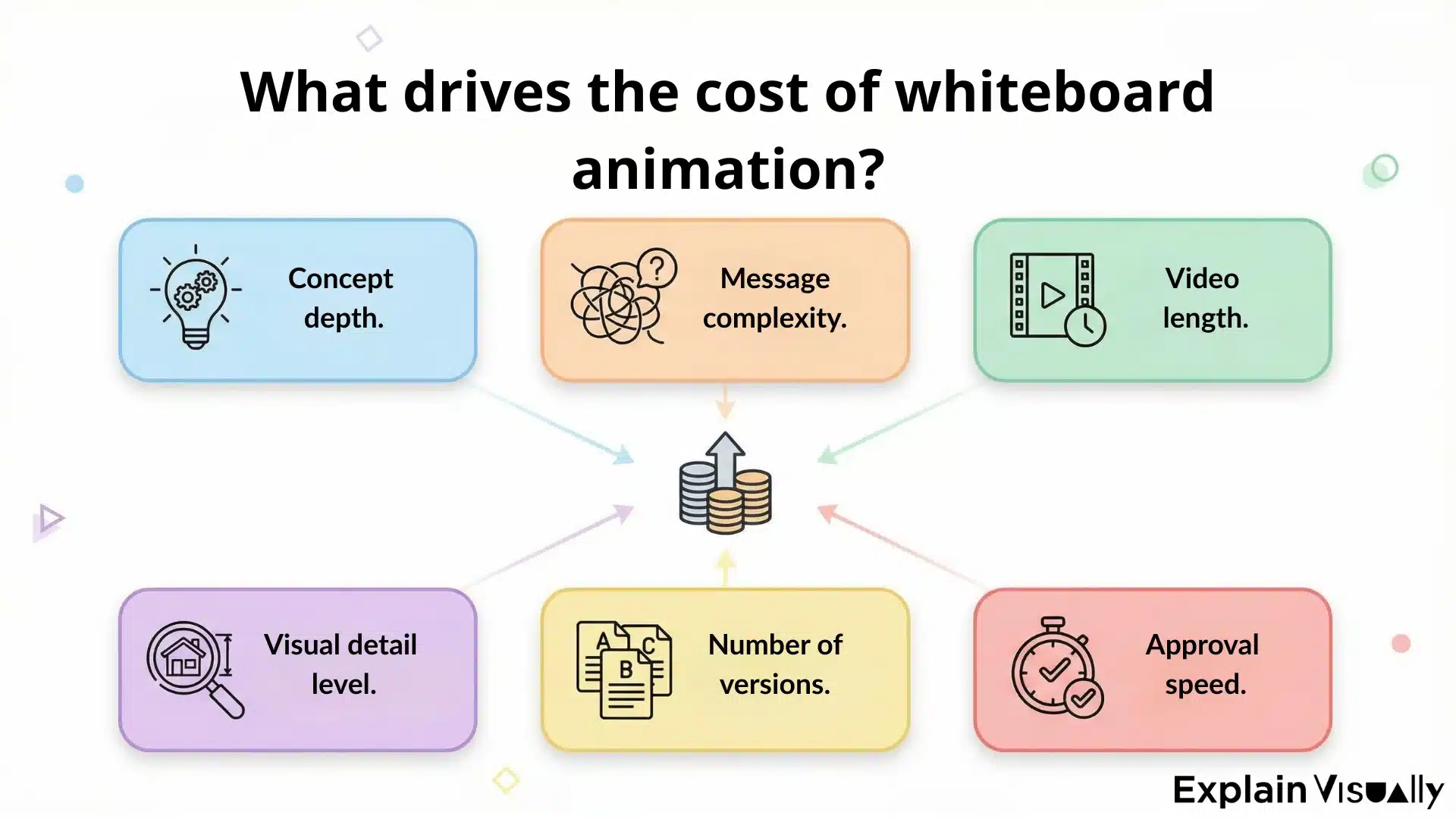
The level of conceptual work matters. If you come with a ready, well-structured script and a clear objective, the scope narrows. If we start from raw notes, conversations with the sales team, and building the structure from scratch, the project grows from the very beginning.
Message complexity also changes the number. A simple product with one core promise is one thing. A technical solution aimed at several target groups, with an implementation process and legal considerations, is something else. Each additional layer requires time to simplify.
Length has its impact as well. Not because every second costs the same. The issue is that as the video gets longer, the number of scenes, drawings, transitions, and decisions increases. Sixty seconds usually means eight to twelve scenes. Two minutes can double the number of points where something can go off track.
Style and level of detail influence production time. A simple whiteboard with a minimalist line is faster to produce than a version with more characters, richer backgrounds, and more developed animation.
It is also worth distinguishing between classic whiteboard and digital whiteboard animation. In the first case, you work with simple drawings and limited movement. In the second, additional layers appear, transitions are smoother, scene composition becomes more complex, and illustrations often require greater precision. This increases the animator’s workload and the time needed to prepare assets. Every additional detail means more production hours.
The number of versions and adaptations adds another layer. Additional languages. Different formats for campaigns. Shortened cuts. Market-specific changes. These are not minor adjustments. They are separate stages of work.
There is one more element, often overlooked. The speed of decisions on the client side. When feedback is fast and coordinated, the project moves smoothly. When comments return in waves from different people, the budget begins to stretch.
DIY tools vs professional studios – the real break-even point
We know this story firsthand. From time to time, a client comes to us after first trying to produce a whiteboard animation internally. „Maybe we can do it in-house. We have the tools”. And that is not a bad decision at the start. Sometimes it is a reasonable step, especially when the project is small, the budget is limited, and the risk is low.
The problem appears when the scale of ambition grows faster than the team’s capacity.
Access to DIY tools has made entering animation easier than ever. Templates, illustration libraries, ready-made hand movements. In a few hours, you can assemble something that looks acceptable. But the cost does not stop at the subscription fee.
There is team time, learning the tool, attempts that do not work, and revisions after publication. Sometimes there are licensing limitations that only surface during a paid campaign. Time is usually the most underestimated factor. A project that was supposed to take a few days stretches into weeks.
When is DIY not the right decision?
When the video is meant to be used in paid campaigns, generate leads, or go through several levels of approval, the cost of a mistake increases. In such projects, pace, message consistency, and confidence that everything works the first time matter. That requires experience that a tool alone cannot replace.
DIY today often means AI. If that is the direction you are exploring, this comparison will help: Whiteboard animation vs AI generated videos. Which is more effective?
Whiteboard animation vs AI generated videos. Which is more effective?
ROI you can defend – so cost isn’t just a line item
The budget for a whiteboard animation is rarely the problem on its own. The problem is the lack of context. If the video is created just to exist, it is hard to defend its cost. When it supports a specific objective, the conversation changes.
At the beginning, you need to decide which return model makes sense in your situation. In lead generation campaigns, you look at cost per lead and the quality of inquiries. In direct sales, conversion rate and revenue within a defined time window matter. In customer support, a video can reduce the number of tickets and shorten handling time. Each of these scenarios requires a different reference point.
The simplest way to structure this is to look at four elements:
- The starting point.
- The change after implementation.
- The time frame
- The numerical result.
What was happening before publication? What changed after it went live? Over what period are you measuring the effect? What specific difference can you see in the data? We know not every team has perfect analytics and full attribution. In such cases, a simple measurement plan is enough: one distribution channel, a clearly defined target audience, a specific objective, and a defined time window.
How to save money without cheapening the video
Saving money in animation does not have to mean lowering the quality. Most of the time, it comes down to smart decisions made at the planning stage.
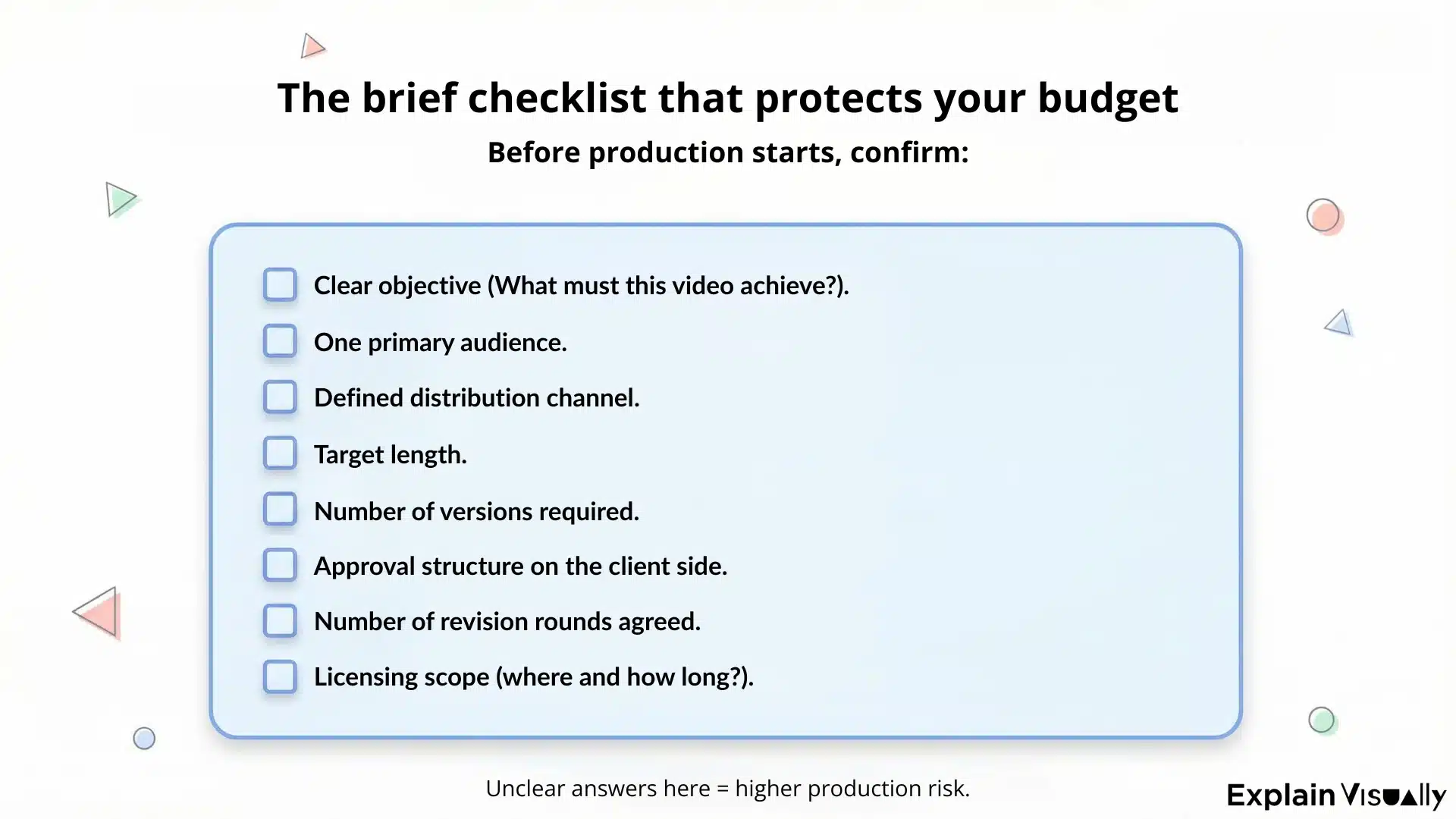
Scope is the first area to watch. Many projects expand before production even starts. Additional scenes, new threads, added arguments. Each of these decisions extends the script, and with it the storyboard and the animation. Discipline at the briefing stage can reduce the cost more effectively than negotiating the rate.
The number of versions is another factor. Instead of creating three separate videos, it is often better to design one core message and plan adaptations at the concept stage. That is more cost-effective than reworking a finished animation.
Style also plays a role. A minimalist whiteboard, when designed well, can be just as convincing as a more elaborate format. We often tell our clients that more detail does not automatically mean better understanding.
A significant part of the budget is also lost due to unclear revision rules. If you do not define at the beginning how many rounds are included and at which stage structural changes can be introduced, the project begins to drift. Every reversed decision costs twice. The simplest way to control the budget is a clear brief.
How to compare quotes without getting played by fine print
Two proposals can look similar on the first page. The same video length. The same style. A comparable price. The differences begin in the details. Most often in what is clearly defined and what has been left out.
We have seen this many times. A client came to us halfway through a project because the budget had already stopped being predictable. In the document they received, everything sounded good. Only during production did it become clear what was missing. The process was paused, but the costs and the stress could not be undone.
In our view, a good quote should not be a general promise. It should clearly show what you are paying for and where the scope of work ends. If the document you are holding leaves too much room for interpretation, the risk will return during production. And that is something everyone wants to avoid.
So, what should be explicit in every proposal?
- Project scope.
Is the script included? Does it cover research and conversations with the team? How many scenes are planned in the storyboard?
- Number of revision rounds.
At which stage? Are structural changes after storyboard approval included, or billed separately?
- Usage rights.
Where can the video be published? For how long? Does it include paid campaigns? Are there territorial limitations for music and voiceover licenses?
- Deliverables.
Is one language version included? Do you receive source files? Are shorter cuts for social media part of the scope?
Red flags!
Have you always thought that the most worrying thing is a high price? Not at all. The most worrying thing is vague language.
– „Unlimited revisions”. Sounds great, right? Until it turns out they apply only to minor text edits, and every structural change requires a new quote.
– „Full rights included”. Without defining the scope. Global? Forever? Paid media included? Sometimes only during expansion to a new market does it become clear that the license was limited.
– No milestones. No clear moments when both sides formally close a stage. That is a direct path to moving several steps backward.
– An overly general description of the style. If the proposal says „whiteboard animation” but gives no example of the level of detail, number of characters, or dynamics, the room for disappointment is wide.
– No information about what happens after storyboard approval. This is a boundary point in most productions. If it is not clearly defined, revisions can return without end.
And one more signal that is often overlooked at the beginning of cooperation:
– Agreeing to everything too quickly. If the provider accepts every scope change without discussing the consequences, the budget will likely return as an issue later.
Explain Visually recommendations – match the format to the job, not your taste
After years of working on animation projects, we see one recurring pattern. The team starts the conversation with style. Someone shows an inspiration. Someone says, „We like this.” And at that moment, the project shifts toward aesthetics before it is even clear what the video is supposed to achieve.
At Explain Visually, we begin differently.
The first question is about context. Where will the audience see this video? In a paid YouTube campaign? On a sales page? During a sales conversation? At a conference, or during employee training?
We are not afraid to say it directly: whiteboard is brilliant when the goal is to organize thinking. When the message is dense, technical, layered. A simple line helps maintain focus and guides the viewer step by step.
Whiteboard animation built to clarify complex information and guide the viewer step by step.
Minimal visuals, disciplined structure, and focus on message clarity.
There are also projects that require more visual energy, more movement, and more space. In those cases, digital whiteboard or another animation style offers greater compositional freedom.
Digital whiteboard animation created to explain OSS and BSS in a way that makes technical systems easier to grasp. More dynamic visuals and controlled motion help break down complex concepts without overwhelming the viewer.
The biggest mistake we observe is adjusting the message to a style that has already been chosen. It should work the other way around. Function first, then form. Sometimes that means advising against a solution the client really likes. That, too, is part of our job.
When Explain Visually is the right partner and when it isn’t
There are projects where we truly feel at home. High communication stakes. A complex topic that needs to be simplified without being oversimplified. Several people on the client side who must align on one clear version of the message. Content that is meant to work longer than a single campaign and be used in different contexts. In such situations, the process we have built over the years makes a real difference. We always start by organizing the thinking.
This is the type of project where clarity mattered more than decoration. Complex message, multiple stakeholders, long-term use. Exactly the kind of environment where our process makes a difference.
There are also projects where we are not the best choice. Very low test budgets. A one-time internal update that will not be reused. Situations where the only priority is to generate a video quickly without conceptual work. In those cases, a simpler solution, or even a DIY tool, may be more appropriate.
We could continue, but this is a good place to stop.
The cost of such a project is rarely accidental. It results from decisions made at the stage of concept, scope, and communication ambition. The more conscious that stage is, the calmer the production process becomes. In our view, whiteboard animation should be neither cheap nor expensive. It should be aligned with the task it is meant to perform for you.
𝐄𝐱𝐩𝐥𝐚𝐢𝐧 𝐕𝐢𝐬𝐮𝐚𝐥𝐥𝐲 – 𝐁𝟐𝐁 𝐚𝐧𝐢𝐦𝐚𝐭𝐢𝐨𝐧 𝐬𝐭𝐮𝐝𝐢𝐨:
We create whiteboard animations for businesses
We create corporate explainer videos
We create visual storytelling for companies
Frequently Asked Questions
What’s a realistic price range in 2026?
In 2026, the cost of custom whiteboard animation sits across a diverse range depending on scope and expectations. For most projects, the price range is shaped less by the type of video and more by what’s included across the entire video lifecycle (script development, animation production, and post production) which together determine the final cost of a whiteboard animation project.
What are the key factors behind the final cost?
The key factors that change whiteboard animation cost (and overall animation cost) are usually: video length, script length, the need to explain complex ideas or complex concepts, and how polished the visuals must be.
If the goal is to effectively communicate key messages to a specific target audience, especially for complex topics or to explain processes, the project typically requires a more compelling script, stronger creative direction, and a detailed storyboard, all of which raise the final cost.
What’s included in a professional production vs a cheaper quote?
A professional whiteboard animation video quote often includes the full pipeline: script, detailed storyboard, custom illustrations, character designs, sound design, sound effects, voiceover, and post production, plus defined rounds of revisions and clear turnaround time.
Cheaper offers may rely on template based solutions, template based scenes, and reusable templates with simple drawings, which can reduce quality, personal touch, and the consistency of the final result, especially when teams need to work closely across multiple stakeholders.
How does style choice affect the budget?
Your animation style and whiteboard animation style are production decisions with real cost impact. Minimal whiteboard animation with simple drawings is faster than a more elaborate approach with higher character complexity, more character movement, richer colour palette, and more smooth transitions.
Some brands also compare whiteboard to 2d animation; while both are animation, the asset build, motion rules, and polish level can differ, affecting animators’ workload and therefore animation cost.
Are voiceover, music, and audio extras?
They can be included or priced separately, so it’s worth checking. A quote may include professional voiceover with professional voice talent (or professional voice artists), plus background music licensing, sound design, and sound effects.
These audio items often depend on usage scope (where the video will run) and can meaningfully shift the whiteboard animation cost, especially for paid campaigns where licensing terms matter.
How do revisions and approvals change the final price?
Revisions are one of the easiest ways for a project budget to drift. A clear scope defines rounds of revisions by stage (script – storyboard – production – final). If the team approves a storyboard and later changes main points, scene order, or the script, production may need to backtrack, raising the final cost and extending turnaround time. This is why many professional studios use milestones and a creative director or lead to keep decisions aligned.
When does DIY make sense versus hiring a studio?
DIY can be a cost effective alternative for internal training materials, quick updates, online courses, or early experiments, especially if you can create something acceptable using template based solutions and existing templates.
Hiring animation studios (including london studios or other professional studios) becomes more cost-effective when whiteboard videos are used as marketing assets, when audience engagement matters, or when the topic is complex and you need custom pacing, stronger writing, and reliable production control for a polished final result.
How can I save money without reducing quality?
To save money, reduce scope in ways that don’t break performance. Start with a strong first draft (or clear inputs) so script development stays focused; lock key messages early; keep the number of versions and deliverables realistic for the entire video; and approve the detailed storyboard before animation begins.
Also align brand guidelines (tone, visual rules, colour palette) early so custom work doesn’t get reworked later. If you’re comparing marketing agencies and animation studios, ask what’s included in creative direction, how they handle revisions, and how they maintain consistency across the whiteboard explainer videos and other explainer videos you may want to produce.
